Native Object Storage Use-Cases
 While there are many use-cases for object storage, I wanted to create a short post to highlight some of the use-cases that I have been trying out in my own lab. Two of the use cases are for backup and logs, and another is as an S3 Foreign Data Wrapper (FDW) for Greenplum databases. In the first use-case, I will show you how to configure an S3 bucket for both VMware Data Services Manager (DSM) backups and logs, both for the databases and the provider appliance itself. In a second backup use-case, I will show how you can configure a Native Object Storage bucket in the vSphere Kubernetes Service Manager (VKSM) and use it as a backup destination for VKS clusters. In my third use-case, we will look at how I can use an S3 bucket for Greenplum Database external tables. The idea is to be able to export cold data out of the database to external tables stored in an S3 bucket, and import them back to warm them up again, ensuring the cold data is not consuming valuable database storage.
Please note that Native Object Storage is still in tech preview, and is only available to some customers for testing. We hope to make it generally available to all our customers very soon.
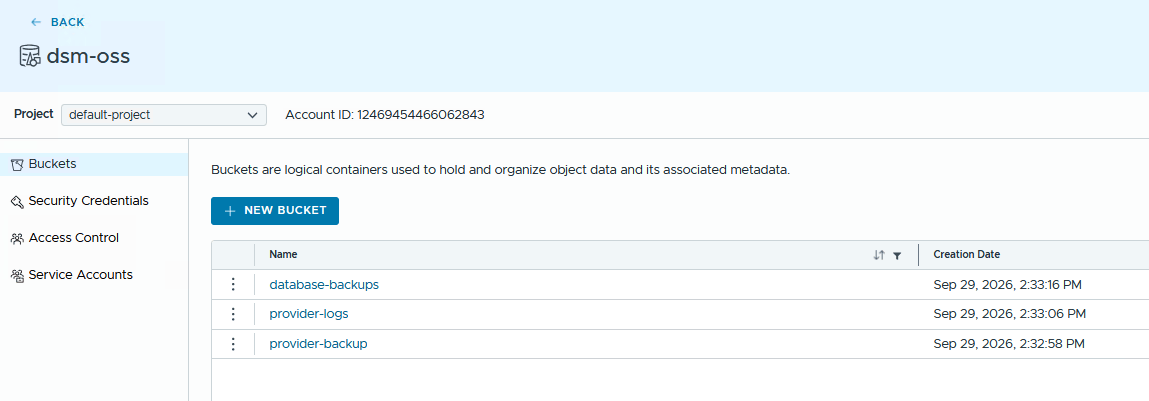
Let’s begin by looking at the buckets that have been created for the different use-cases. In the DSM organization (dsm-org), I created a dedicated object store for DSM backups and logs. In the tenant-03-org, I also created another object store which the organization admin and users use for both VKS backups and Greenplum database external tables. Here are the buckets created for the use-cases.
Buckets for VKS backups and Greenplum database external tables:

Buckets for DSM backups and logs:
VMware Data Services Manager Backups & Logs
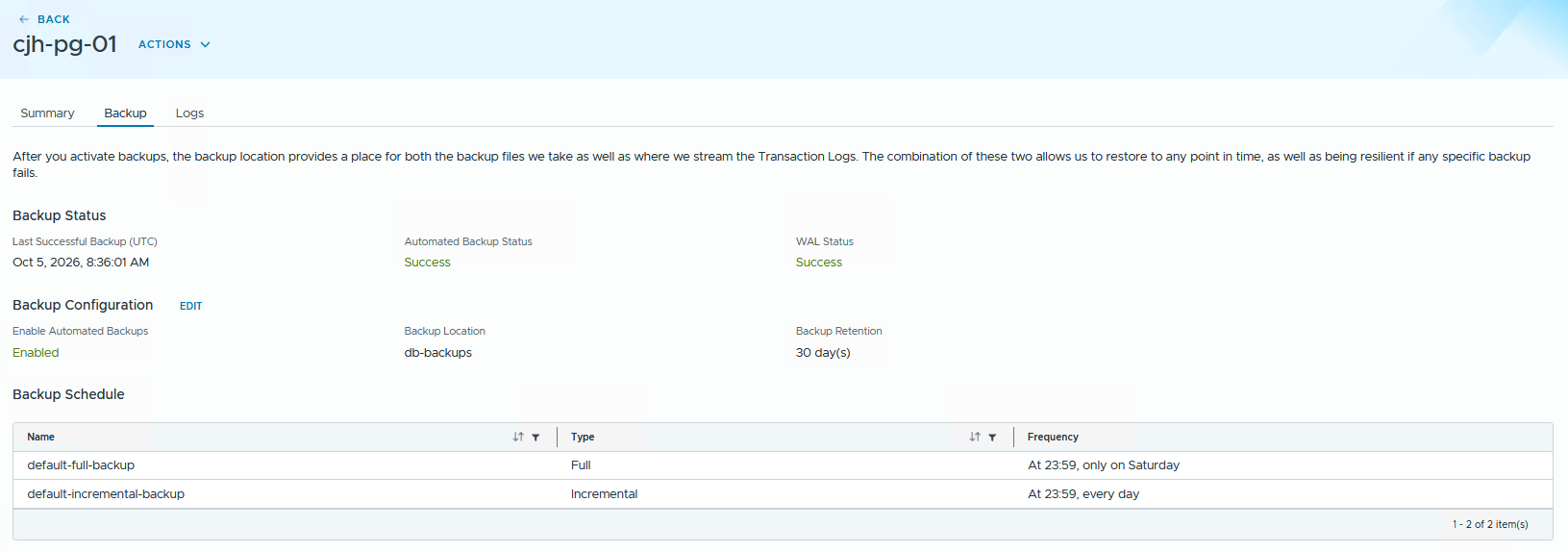
Configuring the VMware Data Services Manager backup and log location is done via the DSM UI. Login as a DSM Admin. Navigate to Settings > Storage Settings. Then populate the entries for System Backup Repository UTL, System Log Repository URL and Database Backup Storage. The bucket names used below map to the bucket names created in the Native Object Store above. Note that DSM will require the CA used to create the Native Object Storage certificates to be added to its list of Trusted Root Certificates to ensure it can secure communication between itself and the Object Store.

This now enables users of DSM to generate log bundles and do point-in-time (PIT) restores of databases.
VKS Backups
When a Kubernetes (VKS) cluster is attached to VKS Management, Data Protection can be optionally enabled. In essence, this is adding the necessary Velero component add-ons to the VKS cluster. The VKSM UI can be used to add credentials and endpoints for backups/restores, mapping directly from the Native Object Store access control and buckets. Below is the VKSM UI in VCFA, showing a Target Location which maps back to the “vks-backups” bucket seen earlier.

Once correctly configured, Data Protection can be configures to take on-time backups or scheduled backups of your VKS and its objects. Below is a view of the Data Protection status of one of my VKS clusters by way of an example:

Greenplum Database External Tables
Greenplum databases supports accessing external data with foreign tables. This includes data in S3 buckets. To achieve this, the Tanzu team have provided a complete set of instructions on how to use an external S3 bucket to write table data to, and read table data from. I won’t go through the complete setup – the instructions are very easy to follow in the official docs. I will show you a few simple psql commands to create some simple tables, one local one and ones which are used to read and write to S3. I will then write table data to the foreign table on S3, making a copy of the local table. I will drop the local table. I will recreate it and finally import the data from S3 back into the local table to show it working.
s3/s3.conf
First, there needs to be an s3/s3.conf file with permissions created for the Greenplum database user who is running the psql command. This configuration file holds the bucket credentials and other configuration information about how the bucket is accessed. This is a very simplified version shown here, with just accessid and secret. I am also asking it to ignore the lack of certificate information. This file must exist on all Greenplum database notes, both coordinators and segments.
[gpadmin@cjhgp01-2 ~]$ cat s3/s3.conf
[default]
accessid = "9O9GPGSIKJRNL6WRIDC1"
secret = "YBOYD9xnOrTC9bZExKPBismRYSpFlFgB1j27OPuJ"
verifycert = false
Create two foreign tables, one for S3 reads and one for S3 writes
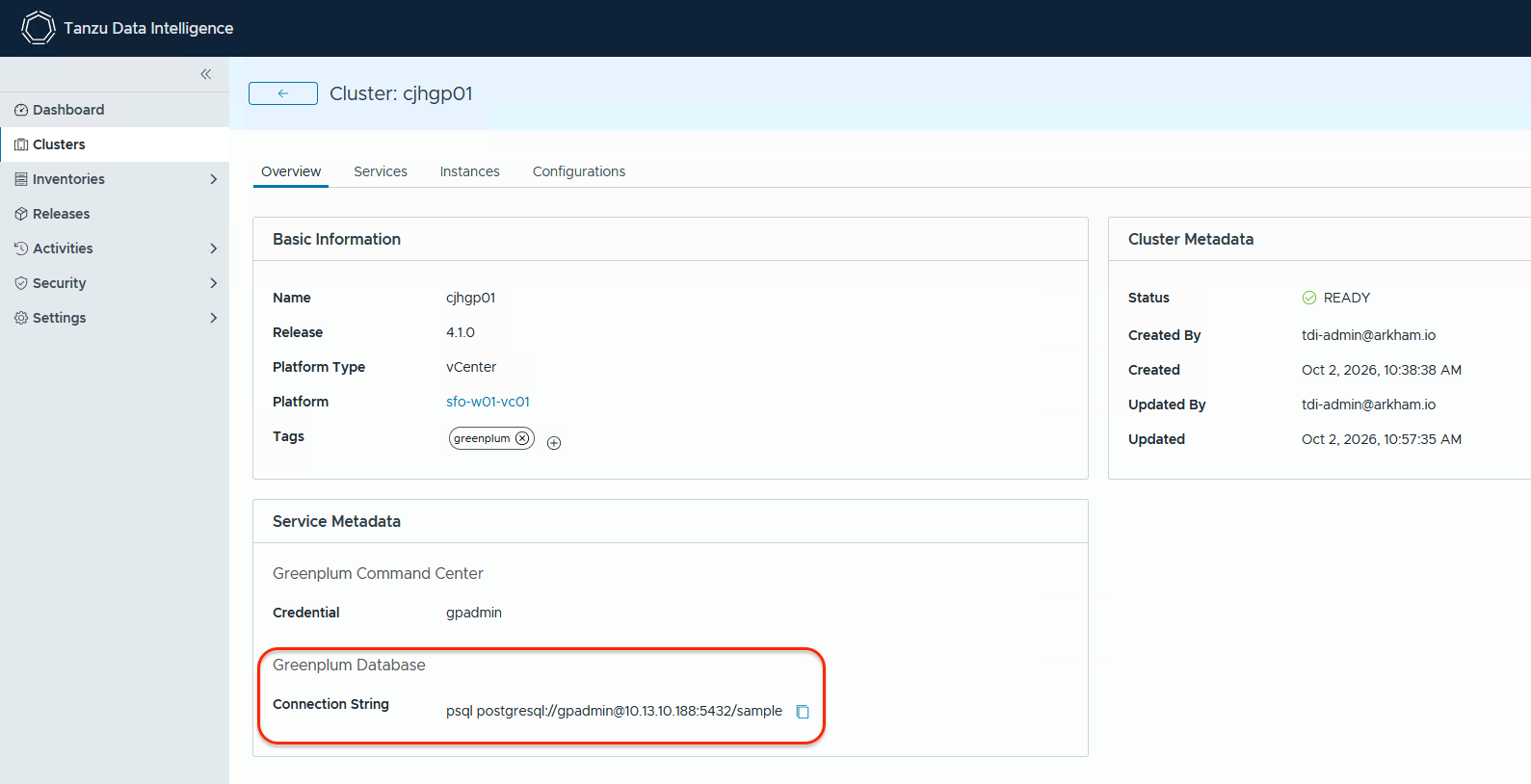
These commands are all run after connecting to the Greenplum database. The connection string can be retrieved from the clusters view of Tanzu Data Intelligence UI, where the Greenplum database was provisioned from. Greenplum spins up a “sample” database which we can use to test with.
sample=# CREATE READABLE EXTERNAL TABLE S3FRUIT (id serial, name varchar(100), colour char(10), sku char(8))
LOCATION('s3://storage-tenant1-oss.rainpole.io:443/greenplum-ext-tables/dataset1/normal/
config=/home/gpadmin/s3/s3.conf')
FORMAT 'csv';
CREATE FOREIGN TABLE

sample=# CREATE WRITABLE EXTERNAL TABLE S3WRFRUIT (LIKE S3FRUIT)
LOCATION('s3://storage-tenant1-oss.rainpole.io:443/greenplum-ext-tables/dataset1/normal/
config=/home/gpadmin/s3/s3.conf')
FORMAT 'csv';
NOTICE:  table doesn't have 'DISTRIBUTED BY' clause, defaulting to distribution columns from LIKE table
CREATE FOREIGN TABLE
Create local table, populate with some sample data
sample=# create table fruit ( id serial, name varchar(100) not null, colour char(10), sku char(8) );
NOTICE:  Table doesn't have 'DISTRIBUTED BY' clause -- Using column named 'id' as the Greenplum Database data distribution key for this table.
HINT:  The 'DISTRIBUTED BY' clause determines the distribution of data. Make sure column(s) chosen are the optimal data distribution key to minimize skew.
CREATE TABLE

sample=# insert into fruit (id, name, colour, sku) values (DEFAULT, 'Apple', 'Red', '4565'), (DEFAULT, 'Durian', 'Green', '4789');
INSERT 0 2

sample=# select * from fruit;
NOTICE:  One or more columns in the following table(s) do not have statistics: fruit
HINT:  For non-partitioned tables, run analyze <table_name>(<column_list>). For partitioned tables, run analyze rootpartition <table_name>(<column_list>). See log for columns missing statistics.
 id |  name  |   colour   |   sku
----+--------+------------+----------
  1 | Apple  | Red        | 4565
  2 | Durian | Green      | 4789
(2 rows)
Copy data from local table to foreign table on S3, then drop local table
sample=# insert into S3WRFRUIT
select * from fruit;
INSERT 0 2

sample=# select * from s3fruit;
 id |  name  |   colour   |   sku
----+--------+------------+----------
  2 | Durian | Green      | 4789
  1 | Apple  | Red        | 4565
(2 rows)

sample=# drop table fruit;
DROP TABLE

sample=# select * from s3fruit;
 id |  name  |   colour   |   sku
----+--------+------------+----------
  2 | Durian | Green      | 4789
  1 | Apple  | Red        | 4565
(2 rows)

sample=# select * from fruit;
ERROR:  relation "fruit" does not exist
LINE 1: select * from fruit;
Recreate local table, read data in from S3 foreign table
sample=# create table fruit ( id serial, name varchar(100) not null, colour char(10), sku char(8) );
NOTICE:  Table doesn't have 'DISTRIBUTED BY' clause -- Using column named 'id' as the Greenplum Database data distribution key for this table.
HINT:  The 'DISTRIBUTED BY' clause determines the distribution of data. Make sure column(s) chosen are the optimal data distribution key to minimize skew.
CREATE TABLE

sample=# insert into fruit
sample-# select * from s3fruit;
INSERT 0 2

sample=# select * from fruit;
NOTICE:  One or more columns in the following table(s) do not have statistics: fruit
HINT:  For non-partitioned tables, run analyze <table_name>(<column_list>). For partitioned tables, run analyze rootpartition <table_name>(<column_list>). See log for columns missing statistics.
 id |  name  |   colour   |   sku
----+--------+------------+----------
  2 | Durian | Green      | 4789
  1 | Apple  | Red        | 4565
(2 rows)
So it would appear that we can successfully read and write data to foreign tables on S3 buckets from Greenplum. And to close, just to show you how this information is written to the S3 bucket in question, here is a screenshot of the contents:

Summary
Those are just a few of the potential use-cases that Native Object Storage can be used for. There are many others of course, some of which our customers have shared with us. Being able to have a landing ground for external tools and utilities is one such example. Being able to share data across different zones though bucket replication is another. And of course S3 object storage can play a significant role for AI workloads, in particular as a library for model files. Customers could download the model from (for example) Hugging Face just once, scan it for viruses, and save the model onto an internal air-gapped S3 object store. Your AI containers then pull the model from there, safe in the knowledge that the model is validated and secure. We look forward to seeing many more use-cases once Native Object Storage is generally available.

One Reply to “Native Object Storage Use-Cases”