Using the VCF CLI with CCI context to manage VCFA provisioned databases
 In a post from last year, I demonstrated how one could use the VCF CLI to troubleshoot the underlying vSphere Kubernetes Service (VKS) on which a VMware Data Services Manager (DSM) database is provisioned. In this follow up post, we will look at how we can use the VCF CLI to fine tune the database itself. This blog post stemmed from a request by one of our customers who wished to modify the backup retention policy and reduce the number of days that a backup is retained.
Now you might be wondering why using the VCF CLI is necessary to do this step. The reason is this. As a DSM Admin, this customer has access to the DSM Gateway API from the DSM appliance. However, changes made to a database provisioned via VCF Automation through the DSM Gateway do not get synchronised to the Supervisor. Thus it is possible that the change gets overridden by subsequent changes on the Supervisor. To make the change persistent, API changes should be made via the Supervisor. This synchronise changes back to DSM. However, to get access to the Supervisor to run kubectl API calls, you first need access to vCenter/vSphere. Not every DSM Admin has access to vCenter. Thus, we explored alternate methods, and found that changes to the database can also be made using using VCF CLI and a CCI context with a API token from VCF Automation. CCI, which stands for Cloud Consumption Interface, is a part of VCF Automation that enables dev-ops users to interact with the various services available in VCFA, such as VKS, VM Service and DSM.
First step is to get your token. Log into your organization in VCF Automation. In the top right hand corner, under User Settings, click My Account. From here you can generate your own API token.
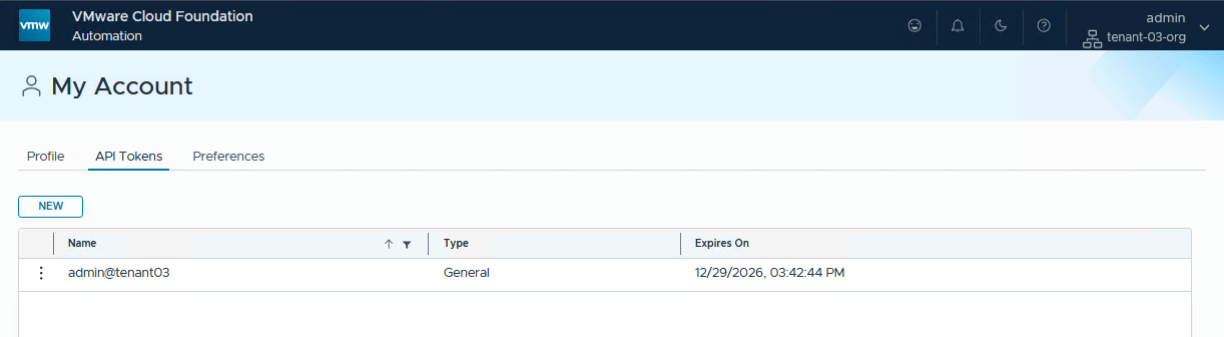
Once the token is safely stored, we can commence with the VCF CLI. Note that the download instructions can be found in my previous post on this topic, and the steps have not changed since then. However, in this case, we won’t be accessing the Supervisor API using vSphere credentials, but the VCF Automation (VCFA) API using the token. Run the following VCF CLI command, choosing a name for the context and setting the type to CCI. I am not using a secure connection, but if you wanted to connect securely, there is an option to provide the Certificate Authority (CA) on the command line. The endpoint is my VCFA and not the Supervisor. You will be prompted to provide the name of the organization where the token was created by the user. In this case it is tenant-03-org.
$ vcf context create my-cci-context --endpoint https://flt-auto01.rainpole.io --type cci \
> --api-token xURVuNVWak0ItQa4JZnRLjhhDZH5Vx9V --insecure-skip-tls-verify

[i] Some initialization of the CLI is required.
[i] Let's set things up for you.  This will just take a few seconds.
[i]
[i] Initialization done!
[i] ==
? Provide Tenant Name:  tenant-03-org
Successfully logged into flt-auto01.rainpole.io
You have access to the following contexts:
   my-cci-context
   my-cci-context:tenant-03-ns-g8krt:default-project
If the namespace context you wish to use is not in this list, you may need to
refresh the context again, or contact your cluster administrator.
To change context, use `vcf context use <context_name>`
[ok] successfully saved context: my-cci-context
[ok] successfully saved context: my-cci-context:tenant-03-ns-g8krt:default-project
$
Now that we have successfully connected to the VCFA organization using the CCI, we need to set context:
$ vcf context use  my-cci-context:tenant-03-ns-g8krt:default-project
[ok] Token is still active. Skipped the token refresh for context "my-cci-context:tenant-03-ns-g8krt:default-project"
[i] Successfully activated context 'my-cci-context:tenant-03-ns-g8krt:default-project' (Type: cloud-consumption-interface)
[i] Using image repository hosts for context 192.168.41.71/vcf/vcf-cli-plugins/ga/plugin-inventory/v9-rel/plugin-inventory:latest
[i] Refreshing plugin inventory cache for "192.168.41.71/vcf/vcf-cli-plugins/ga/plugin-inventory/v9-rel/plugin-inventory:latest", this will take a few seconds.
[i] Fetching recommended plugins for active context 'my-cci-context:tenant-03-ns-g8krt:default-project'...
[i] No image repository override information was found
[i] Installing the following plugins recommended by context 'my-cci-context:tenant-03-ns-g8krt:default-project':
  NAME                INSTALLING
  addon               v3.7.0
  cluster             v3.7.0
  kubernetes-release  v3.7.0
  namespaces          v9.1.1
  package             v3.7.0
  registry-secret     v3.7.0
  vm                  v9.1.1
[i] Refreshing plugin inventory cache for "192.168.41.71/vcf/vcf-cli-plugins/ga/plugin-inventory/v9-rel/plugin-inventory:latest", this will take a few seconds.
[i] Refreshing plugin inventory cache for "192.168.41.71/vcf/vcf-cli-plugins/ga/plugin-inventory/v9-rel/plugin-inventory:latest", this will take a few seconds.
[i] Refreshing plugin inventory cache for "192.168.41.71/vcf/vcf-cli-plugins/ga/plugin-inventory/v9-rel/plugin-inventory:latest", this will take a few seconds.
[i] Refreshing plugin inventory cache for "192.168.41.71/vcf/vcf-cli-plugins/ga/plugin-inventory/v9-rel/plugin-inventory:latest", this will take a few seconds.
[i] Refreshing plugin inventory cache for "192.168.41.71/vcf/vcf-cli-plugins/ga/plugin-inventory/v9-rel/plugin-inventory:latest", this will take a few seconds.
[i] Refreshing plugin inventory cache for "192.168.41.71/vcf/vcf-cli-plugins/ga/plugin-inventory/v9-rel/plugin-inventory:latest", this will take a few seconds.
[i] Refreshing plugin inventory cache for "192.168.41.71/vcf/vcf-cli-plugins/ga/plugin-inventory/v9-rel/plugin-inventory:latest", this will take a few seconds.
[x] unable to automatically sync the plugins recommended by the active context. Please run 'vcf plugin sync' to sync plugins manually, error: [unable to list plugins from discovery source 'default': unable to fetch the inventory of discovery 'default' for plugins: plugins discovery image resolution failed. Please check that the repository image URL "192.168.41.71/vcf/vcf-cli-plugins/ga/plugin-inventory/v9-rel/plugin-inventory:latest" is correct: error getting the image digest: GET https://192.168.41.71/v2/vcf/vcf-cli-plugins/ga/plugin-inventory/v9-rel/plugin-inventory/manifests/latest: NOT_FOUND: resource not found: repo vcf/vcf-cli-plugins/ga/plugin-inventory/v9-rel/plugin-inventory, tag latest not found, unable to find plugin 'addon' matching version 'v3.7.0', unable to find plugin 'cluster' matching version 'v3.7.0', unable to find plugin 'kubernetes-release' matching version 'v3.7.0', unable to find plugin 'namespaces' matching version 'v9.1.1', unable to find plugin 'package' matching version 'v3.7.0', unable to find plugin 'registry-secret' matching version 'v3.7.0', unable to find plugin 'vm' matching version 'v9.1.1']
$
We can begin to query the databases, and even make our change. I can interact with the database and other objects using kubectl. In this example, I am going to modify the provisioned database and reduce the backup retention policy (spec.backupConfig.backupRetentionDays) from the default of 30 days down to 15 days. I list the PostgreSQL clusters in my organization, I check the current backup retention settings, I edit the retention value, wait for the cluster to reconcile before finally verifying that the change has taken effect. In the commands below, k is aliased to kubectl.
$ k get postgresclusters
NAME          STATUS   STORAGE   VERSION                AGE
pg-for-test   Ready    20Gi      18.4+vmware.v9.1.1.0   26h

$ k get postgresclusters pg-for-test -o jsonpath='{.spec.backupConfig.backupRetentionDays}{"\n"}'
30

$ k edit postgresclusters pg-for-test
postgrescluster.databases.dataservices.vmware.com/pg-for-test edited

$ k get postgresclusters
NAME          STATUS       STORAGE   VERSION                AGE
pg-for-test   InProgress   20Gi      18.4+vmware.v9.1.1.0   26h

$ k get postgresclusters pg-for-test
NAME          STATUS   STORAGE   VERSION                AGE
pg-for-test   Ready    20Gi      18.4+vmware.v9.1.1.0   26h

$ k get postgresclusters pg-for-test -o jsonpath='{.spec.backupConfig.backupRetentionDays}{"\n"}'
15
And if I check back on VCF Automation, selecting my database followed by Backup tab, I can see the reduced Retention value reflected in the UI.
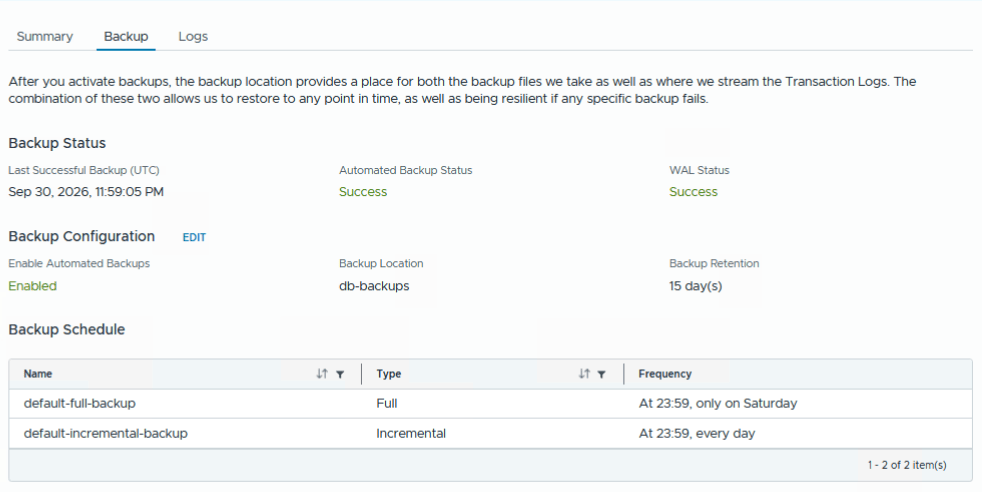
So now we have a way of changing database configuration using the API, but without needing vCenter access or needing to log into the Supervisor.

One Reply to “Using the VCF CLI with CCI context to manage VCFA provisioned databases”