Using VCF Automation 9.1 Blueprints to snapshot and clone DSM provisioned MySQL databases
 In my VMware Data Services Manager 9.1 launch post, I mentioned that this release now has the ability to use vSAN ESA snapshots to create a copy of a MySQL database. I also mentioned that this snapshot could then be used to very quickly spin up additional copies of the database using the “clone from snapshot” feature. I also mentioned that this feature is not yet plumbed up into the VCF Automation UI, but that it is available via the API. And since that is the case, it is then possible to go ahead and create VCF Automation blueprint. The blueprint can be made to request information from the user about the MySQL database that is to be snapshot’ed. And using this information, another blueprint could be created to clone a new MySQL database from this snapshot. In this blog post, I will show you how to do exactly that.
First, you will need some simple scripts to get you started. If you are unfamiliar with blueprints, feel free to download some of my simple examples from my GitHub repo here. The blueprints that I will use in this post are the “create-mysql-snpshot.blp” and “create-mysql-from-snap.blp”.
Next, we should discuss the personas that can be granted to VCF Automation Organization users. We have Project Admins, Project Advanced Users and Project Users. Only the Project Admins can do Blueprint designs. Project Advanced Users and Project Users do not have access to blueprint designs, but both can consume request blueprints from the catalog. These are the users in my organization:

Create MySQL Snapshot
Let’s start by creating the snapshot of an existing MySQL database. I will login to the organization as user ‘cormac’ who is a project admin. Under Build & Deploy, select Content Hub > Blueprint Design. From the Blueprints > “New From” dropdown, we can begin to import the blueprints downloaded from the GitHub repo mentioned earlier.

Next, provide general information about the blueprint. Select the name, optional description, project, whether to share the blueprint with other projects in the organization, upload the downloaded blueprint, and optionally select an icon for the catalog item.

The blueprint should now be visible.

You can now begin to modify the blueprint to match your own environment. Click on the name of the blueprint to enter ‘edit’ mode:

There are two sections to the blueprint code. First, you are setting up your inputs which will be used to prompt the user to provide information about the MySQL database to snapshot. The second is actually the piece of YAML code which matches the object your are trying to create. For us, this is a MySQL snapshot as defined in the DSM API. You can now fine-tune the code, correcting namespace names and other default values. When you are happy with the code, click on the ‘TEST’ button in the lower left hand corner of the screen. This will launch the blueprint but will only check syntax – it does not do an actual test.

If the test is successful, it will report back something similar to the following:

To add the blueprint to the catalog, click on the VERSION button, and add a description, a change log and check the box to publish the blueprint to the catalog. Now, navigate to the Catalog in the left hand navigation menu, and the item should be available.

Now you can request a deployment of the catalog item. A deployment name is needed so the request can be identified in the instances view. The other items relate to the Supervisor namespace where the MySQL database is deployed from, the name of the database and the name of the snapshot that you wish to create:

Click Submit, and the name of the deployment will be displayed as in progress. If you then click on the name of the deployment (demo), and then the History view, you should be able to observer various events occurring as the snapshot is getting created. This is also a good place to check if the snapshot creation fails as it should report which part of the job the snapshot failed at.

Tasks will also be visible in the vSphere client as the snapshot is getting provisioned.

Eventually, you should be able to observe that the request completed successfully and that the blueprint has been able to take a snapshot of an existing MySQL database.

It is also possible to check on the snapshot through the API or by logging into the DSM appliance as the root user and running the following command (kg is an alias for kubectl which points to the gateway KUBECONFIG):
# kg get mysqlsnapshots -n b03cde-tenant-02-ns-01-5wtsk
NAME                 CLUSTERNAME    STATUS   CREATED
mysql-db01-snap-01   mysql-db01     Ready    24m
Clone MySQL Snapshot to new database
We can now start to look at the second part of the post, which is how to clone a snapshot to create a new MySQL database. Once more, we can begin by importing an existing blueprint to do the clone operation. This can once again be retrieved from my GitHub repo, and the process is identical to before.

Fine tune any code, and the default values to match your own environment. Again, items such as namespaces will need to be changed to reflect your setup. the only inputs this time are the name of the new database and the name of the snapshot. Many of the other parameters simply relate to the information that one would need to provide when creating a MySQL database. But you can tune the code for all of these entries. Use the TEST button once again to make sure that the fields are populating as expected.

Use the VERSION button to upload a copy of the blueprint to the catalog when you are happy with the code and the tests are successful.

Verify the item appears in the catalog alongside our snapshot entry:

Once added to the catalog, you can make a request to clone a new MySQL database from an existing snapshot.
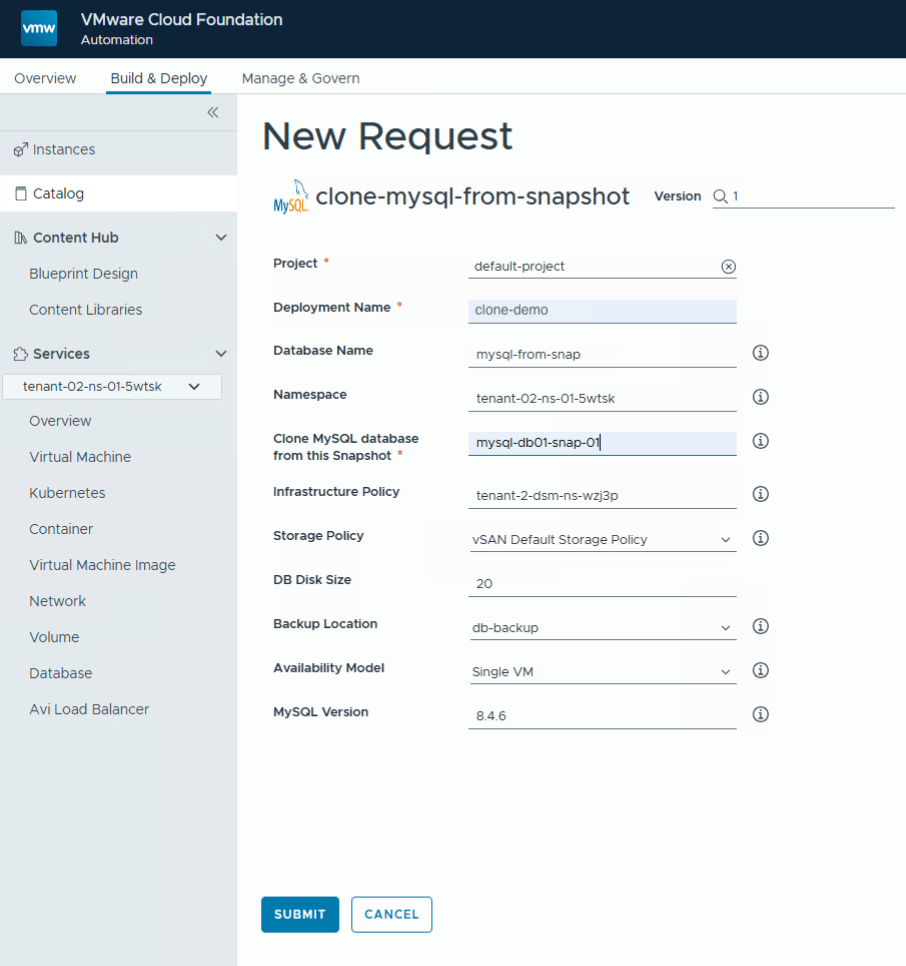
Again, you can monitor the clone request in the same way as you monitored the snapshot request. In fact, this can also be monitored from the DSM UI if you wish.
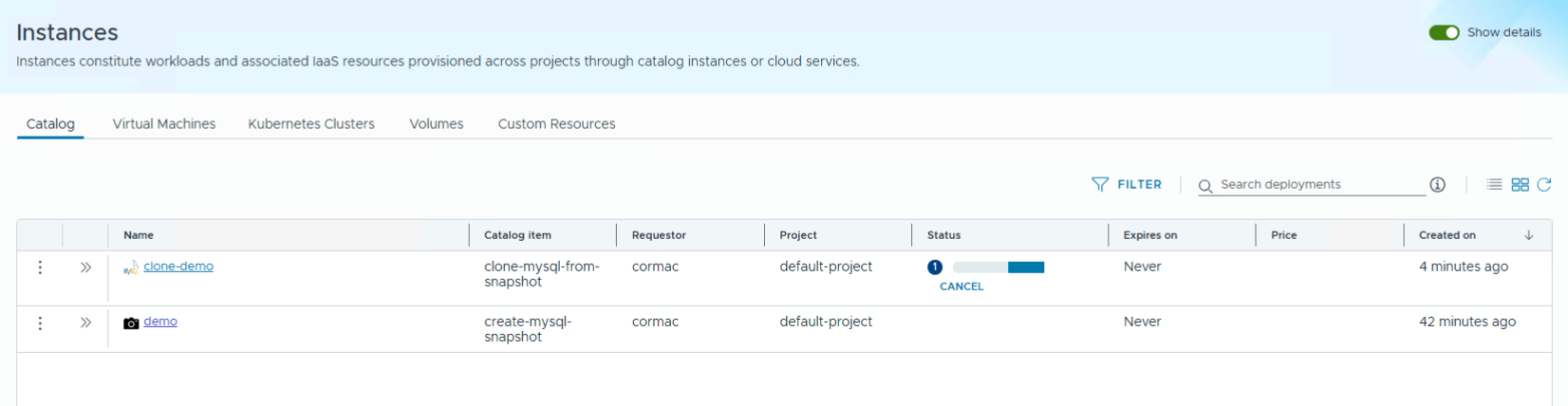 And if everything has gone smoothly, you can click on the deployment (clone-demo) to get further details, similar to what we saw with the snapshot. The new database should also be Ready under the Databases view in the tenant’s namespace, as shown below. The original database which the snapshot was taken from is also visible in this view.

Summary
In Data Services Manager version 9.1, MySQL databases can now leverage the the new snapshot capability in vSAN ESA. Although not available for selection direction in the VCF Automation UI, the blueprint feature allows project admin users to create catalog items which can then be requested by other project users.
Now, you might be thinking that this is all well and good, but it needs vSAN. You would be correct. But have you considered using your existing certified ESX hosts as vSAN ESA nodes by adding NVMe devices? Were you aware that you could do this? If so, and you were planning to do so, we would like to hear from you. Even if you’re not, we would still like to hear from you. You will find a short survey link here.
