Announcing Data Services Manager 9.1
 It gives me great pleasure to announce the availability of Data Services Manger version 9.1. This releases sees a new data service, Microsoft SQL Server, now included in Data Services Manager. I know many of our customers are anticipating this data service, so it is great to finally announce it. The Data Services Manager 9.1 release also brings tighter integration with VMware Cloud Foundation (VCF) version 9.1 and VCF Automation version 9.1. Both of these exciting features will be covered in deep-dive posts over the coming weeks, but today, I want this post to briefly highlight all of the new functionality that is now available in Data Services Manager 9.1.
Introducing a new data service – Microsoft SQL Server
With Data Services Manager version 9.1, we can now offer Microsoft SQL Server as a service, alongside our existing PostgreSQL & MySQL services. Without going into too much detail, the following functionality is now available with this new service:
- Fleet Management for SQL Server Instances/Engines and SQL Server Databases
- AlwaysOn Availability Groups (AAG) for high availability
- Configurable Custom Certificates for secure communication
- Automated Backup Schedules with Point In Time (PIT) Restores
- Configurable Maintenance Windows for staged (out of hours) updates
- Automated Active Directory integration for DSM provisioned SQL Server Instances
- Automated DNS updates with FDQN of DSM provisioned SQL Server Instances
- Windows Authentication and SQL Server Authentication supported
- Support for Advanced Configuration Settings, Collation & Auditing
- SQL Server Agent support with job scheduling
- Easy Clone and Restore of databases using UI and/or API with YAML manifests
- Easy Connect to the Database with Connection String
- Configurable metrics forwarding to VCF Operations and Prometheus
- Configurable log shipping to VCF Operations for Logs and other endpoints
- Fully integrated with VCF Automation providing multi-tenancy controls
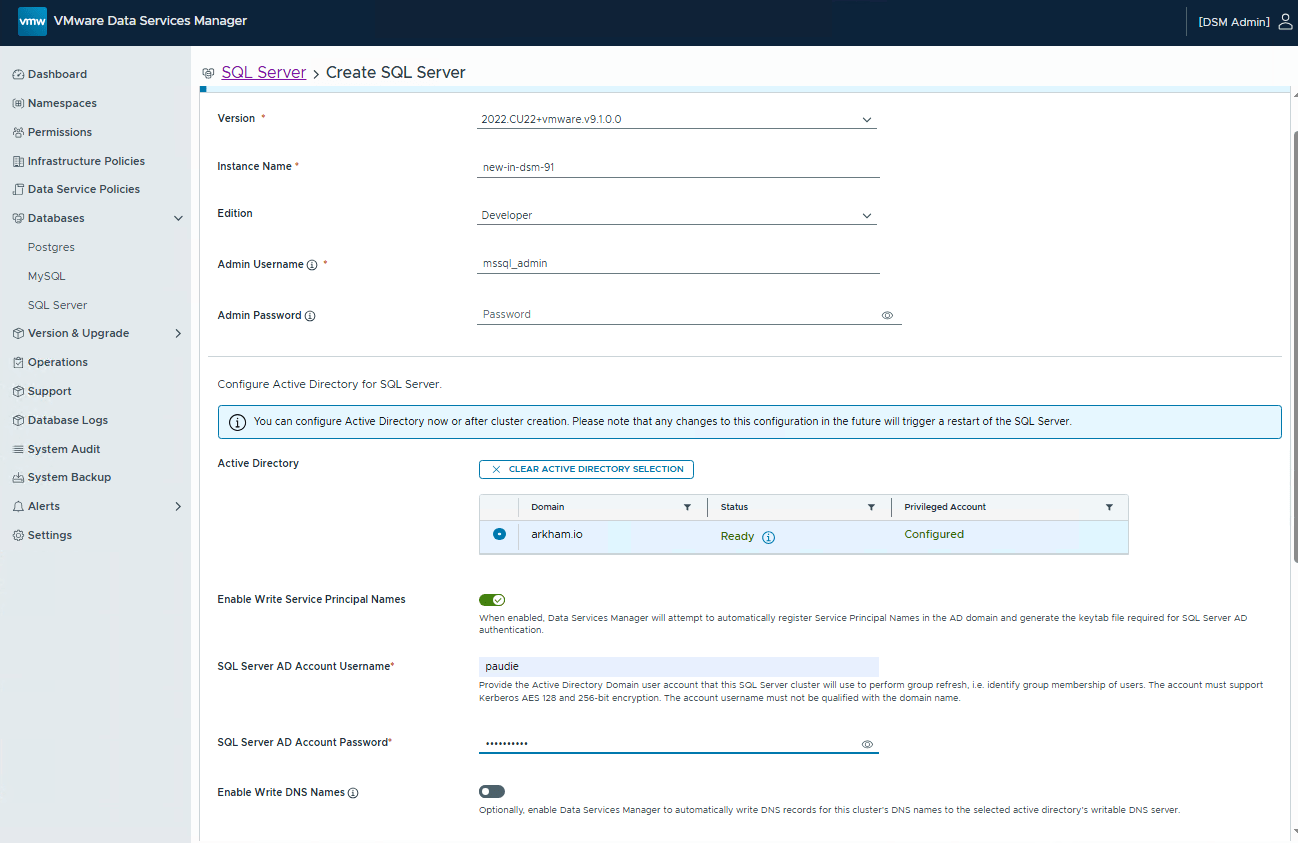
And, in case you missed it, this data service runs within containers SQL Server on Linux to provide a standardised database-as-a-service environment. It has no dependency on an underlying Windows OS or associated Windows OS licensing which will be a significant saving to many of our customers. A special word of thanks must go to our design partners who helped us to get this service enterprise-ready.
Improvements to the existing PostgreSQL data service
Data Services Manager version 9.1 introduces a new availability enhancement for PostgreSQL databases. The 9.1 version now supports restoring PostgreSQL clusters from a backup that was generated by a different Data Services Manager instance. In other words, Data Services Manager can now do cross-instance S3 restores, which is extremely useful should a Disaster Recovery (DR) type event scenario occur in your organization.
Improvements to the existing MySQL data service
Most of you will be familiar with vSAN, and more recently, the greatly improved vSAN Express Storage Architecture (ESA). One of the relatively recent enhancements to vSAN ESA is the introduction of enhanced linked clones and snapshots technologies. This creates storage-efficient thin volume copies on vSAN ESA datastores. In Data Services Manager version 9.1, MySQL databases now support snapshot creation on vSAN ESA, and can then use fast database cloning functionality with zero downtime to create copies of the existing database.
This snapshot functionality requires that the MySQL databases use a Supervisor Namespace Infra Policy. The snapshot controls are not yet plumbed up into the data services section of the VCF Automation UI for end-users to consume directly. However it is possible to leverage the API to create snapshots, and clone databases from the resulting snapshots. Since these functions are available in the API, they can be built into VCF Automation Blueprints and hosted in a catalog. This allows your users to leverage the functionality with a few clicks. Here is an example of a snapshot taken of a running MySQL database:

And from this snapshot, a linked clone can be made to create a brand new database. Note the new Linked Clone type shown in the Data Services Manager portal for such a deployment:

This is a nice VCF 9.1 addition for both vSAN ESA and Data Services Manager customers.
VCF Automation integration
DSM 9.1 brings a lot of “fit & finish” to the VCF Automation integration. All three data services – PostgreSQL, MySQL and SQL Server – are now plumbed up for selection in the Org portal for tenants who have been granted permission to provision databases. Data Service Policies have also been improved so that Provider Administrators can now have more granular control over how organisations provision databases. Again, this is an area I will visit in greater detail in future blog posts, especially the integration with SQL Server, but for now I just wanted to highlight that all data services are available in VCF Automation, as shown below.

Onboarding existing databases into DSM
This is a feature that many customers have been asking for some time. The Data Services Manager 9.1 release includes documented, supported workflows for onboarding existing unmanaged databases into Data Services Manager. This is great news for customers who are already suffering from data sprawl, but also customers who want to have a more holistic way of managing their databases. Now they can just bring them into Data Services Manager and manage them as part of their overall fleet of databases.
Summary
All in all, this is a great release for Data Services Manager customers. The long awaited SQL Server data services is now generally available, and can be consumed through both the DSM appliance portal or consumed via VCF Automation. And alongside SQL Server integration with VCF Automation, there is also full integration for both PostgreSQL and MySQL. Data Services Policies in VCF Automation have also been greatly extended, giving the Provider Administrators much more control over the data services offered to their tenants.

2 Replies to “Announcing Data Services Manager 9.1”
Comments are closed.