Announcing VMware Data Services Manager 9.1.1
 As part of the latest VMware Cloud Foundation version 9.1.1 release (see this link for more details), it gives me great pleasure to announce that we also have a new 9.1.1 version of VMware Data Services Manager (DSM). This is a not just a patch release. It is a release that is chock-full of new features and enhancements. I will share the details with you in this post. This 9.1.1 DSM release is building on top of some of the cool features that we provided in DSM & VCF version 9.1. In later posts, I will delve into some of the newer features and enhancements in greater detail.
Unified DSM Install Experience direct from VCF Automation
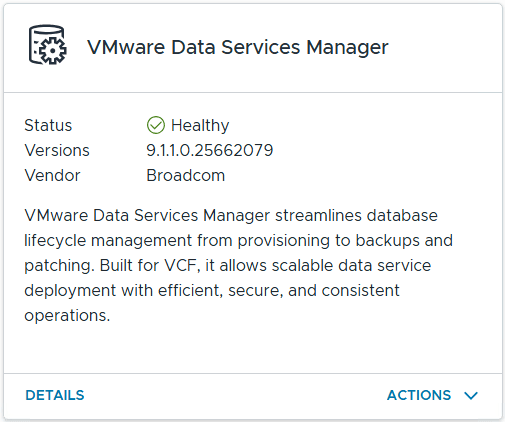 First and foremost, the installation experience for customers integrating their VMware Data Services Manager with VCF Automation (VCFA) has improved dramatically. Those of you who have been following my previous blogs on how to get started with DSM and VCFA will know that a number of context switches were required between different User Interfaces (UIs) – DSM, vSphere Client and VCFA – to get up and running. In VCF 9.1.1, Data Services Manager is a first-class VCF Service, so the deployment of DSM can be initiated directly from VCFA. This includes the rollout of the DSM Provider Appliance VM, the Consumption Operator on the Supervisor, connecting to a vCenter Server, setting up an initial DSM Admin account and selecting a dedicated DSM Organization in VCFA. Once the dedicated DSM Org is created, any namespaces created within this dedicated DSM organisation automatically become DSM Infrastructure Policies. This will speed up the deployment process considerably, and make it far easier for VCFA Provider Admins to do an initial setup. The DSM UI can also be launched directly from VCF Automation for additional configuration tasks. Here is a look at the Data Services Manager interface in VCF Automation. You can see additional enhancements such as the ability to create SQL Servers and setup Active Directory Domains directly from VCFA. Policies now represents what were previously called Data Service Policies, and control which organizations are allowed to access data services and their related resources.

Higher Database Availability with Multi-Zone Support
A Supervisor can contain multiple vSphere Clusters, each of which can be configured as a supervisor zone. Namespaces can now be constructed to span multiple supervisor zones. Namespaces can also be created in the dedicated DSM Organization to be used as infrastructure policies for the provisioning of databases. If a multi-zone namespace-based infrastructure policy is chosen when provisioning a database, the database will be deployed with nodes placed in different zones. This also means that different database objects (e.g., for Postgres, this implies the primary, replica and monitor pods) are placed on different nodes in different zones. The end result is even higher availability for your DSM provisioned databases should a full zone failure occur. I know some customers have been waiting on this feature, so it is nice to see this fully available for DSM and VCF Automation version 9.1.1.
Support for PostgreSQL version 18
DSM can now provision databases running PostgreSQL version 18. We have also retired the older PostgreSQL version 13. Our customers can now provision 5 different major versions of PostgreSQL, from version 14 all the way through to version 18.
Support for additional PostgreSQL Read Replicas
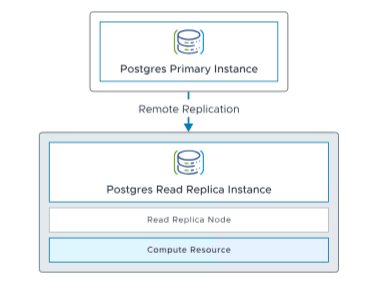 Although this features has been available in MySQL for some time, DSM version 9.1.1 introduces support to add additional read replicas to PostgreSQL databases. Note some changes in terminology though. Beginning with version 9.1.1, DSM uses the term read replica instead of secondary to refer to remote PostgreSQL database instances that replicate data from a primary database. Read replicas now serve both disaster recovery and read-scaling use cases. Once Remote Replication is enabled on the PostgreSQL primary database, the same workflow used for DR is now used to enable the creation of additional PostgreSQL read replicas. This workflow is identical to the creation of a secondary database that we saw in prior releases. Once the read replica is created, it can be used by read-only workloads. This is a very useful feature for customers who wish to scale their databases for read intensive workloads.
Support for SQL Server 2025 & gMSAs
We announced support for SQL Server 2022 in DSM release 9.1. In this release, we are extending for SQL Server on Linux to include SQL Server 2025, along with recent Cumulative Updates. For VCF Automation customers, the main thing to note is that the SQL Server instance can now be provisioned from VCFA by the Provider Admin. DSM admins no longer need to do the SQL Server instance deployment via the DSM portal. VCFA Organization tenants can continue to provision SQL Server databases as before, so long as their respective Data Service Policy allows their organization to do so. This release also include support for gMSAs (Group Managed Service Accounts). These are domain accounts which are secure by design. They use strong, rotated passwords from Active Directory. These accounts can also manage their own Service Principal Names (SPNs) and allow encrypted network communication (Kerberos) to happen securely.
Support for SQL Server Native Backup Encryption
A much sought after feature next. We’ve heard from customers that they want to be able to encrypt their SQL Server backups. In 9.1.1, this is now available through the API. This feature can be activated by adding a PFX file to the SQL Server instance specification. This PFX (Personal Information Exchange) file is password-protected and contains the SSL/TLS public key certificate and its matching private key. It is added to the spec.serverConfig.certificates of the SQL Server instance, and then referenced via spec.serverConfig.backupEncryptionCertificate. All databases created on the SQL Server instance will now have encrypted backups if this is configured. Note that if you wish to restore an encrypted database to a new SQL Server instance, the same certificate used to encrypt the backup must be imported onto the target SQL Server instance. A nice security feature for your SQL Server databases.
Support for SQL Server Transparent Data Encryption (TDE)
Similarly, another security enhancement now available for SQL Server 9.1.1 is database-level encryption which is achieved by enabling Transparent Data Encryption (TDE). This once again requires adding a certificate to the specification of the SQL Server instance, spec.serverConfig.certificates, as seen previously. Then, on the user database, the database owner can use TSQL commands to create an encryption key. Finally, the db_owner can turn on encryption by performing ALTER DATABASE .. SET ENCRYPTION ON. Another nice security feature for your SQL Server databases.
Complete Disaster Recovery (DR) workflows in VCFA
This is something we have been working towards over the past several releases, but in version 9.1.1, I am pleased to say that we have full DSM database Disaster Recovery (DR) workflows plumbed in to VCF Automation. This means that administrators can initiate actions such as “Block Connections”, “Promote”, “Demote” and “Unblock Connections” directly from the database context in VCF Automation, and not have to context switch out to the DSM Provider UI to perform these tasks.
Data Services Manager Network Security
As you can probably tell, security has been top of mind in this release. Some of these we have seen already, but this one is particularly interesting and applies to all databases. The DSM team has introduced a new network security feature for databases. Once activated, this feature automatically puts in place the necessary NSX gateway firewall rules and distributed firewall rules to ensure that the database is secured. The only ports and communication channels that remain open are a management path between the DSM Provider appliance and the database and a data path from the tenant’s namespace (the tenant who requested the database to be created) and the database. This feature is located in the Advanced Section of Data Services Manager in the VCF Automation Provider view.
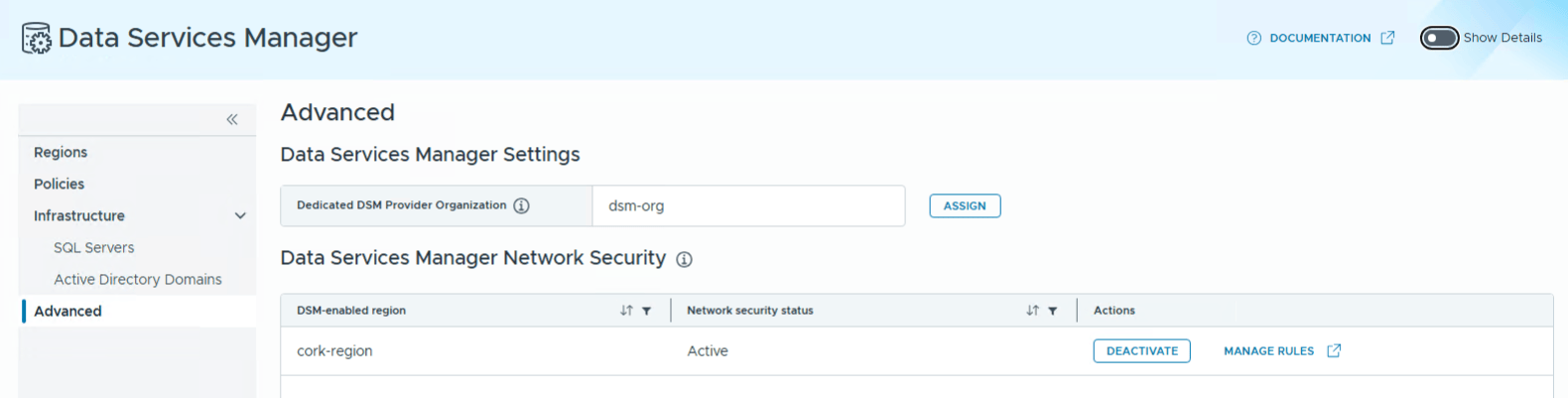
If a client needs to connect to the database from an external IP address (outside of the tenant’s namespace and organization), then simply add it to the “Extra IP address” section of the database configuration. The Network Security features will automatically create the necessary rules to allow this client to connect to the database from the external IP address.
Note that the Advanced view is also where you define the default DSM organization. Any namespaces created in this organization become infrastructure policies for the provisioning of databases.
Locking down SSH Access
Continuing the security theme in DSM 9.1.1, there is no SSH interface to DSM appliance by default when provisioned via VCF Automation. The Provider Admin needs to configure SSH access. This is done by creating a new VirtualMachineService of type Load Balancer for the DSM Appliance. This task is done from the Supervisor using its Kubernetes API. This service must be configured to allow SSH on port 22. The root password is auto-created and stored in a K8s secret. This secret must also be retrieved and decoded. This is part of an ongoing effort to make VMware Data Services Manager more secure.
PostgreSQL Extensions
Historically, DSM has always loaded the pg_stat_statements, pgaudit and pg_cron extensions onto its Postgres databases even if customers were not using them. In DSM version 9.1.1, you can now optionally load these libraries using the PostgreSQL shared_preload_libraries mechanism.
Another update in this space is that the set_user extension is now included in DSM’s PostgreSQL distributions. This extension allows switching users and optional privilege escalation and adds logging when unprivileged users escalate themselves.
Additional Metrics Target
In previous releases, it was possible to set up additional Metrics Targets, either VCF Operations or Prometheus. However, you could only send all metrics to one target, and per-namespace metrics to other target. In this release, it is now possible to send all metrics to multiple targets. The only requirement is that when you configure the metrics targets, they need to have a specific naming convention; the first must be called metrics-default and the other metrics-additional:
root@photon-a526d7c1c992 [ ~ ]# kg get metricstargets -A
NAMESPACE    NAME                 STATUS
dsm-system   metrics-additional   Ready
dsm-system   metrics-default      Ready
Summary
As you can see, this is a very impactful release of VMware Data Services Manager. We have closed the gap on providing consistent feature parity for customers no matter which deployment model of DSM is used (standalone or VCFA). We have also added a bunch of new benefits around security and resilience, and also introduced some newer engine versions, reaffirming that VMware Data Services Manager is the best database as a service (DBaaS) solution for VMware Cloud Foundation.

3 Replies to “Announcing VMware Data Services Manager 9.1.1”